Introduction
The Path of Exile economy is one of the most dynamic and complex player-driven markets in all of gaming. With thousands of items, dozens of currency types, and prices that shift by the hour — especially at league start — navigating it without reliable data is nearly impossible. That is where the PoE Ninja Economy tracker becomes your most important tool.
The poe ninja economy section gives every Path of Exile player access to the same live market intelligence that top traders and currency farmers rely on every single session. Whether you are trying to price a rare drop, time a bulk currency exchange, identify a profitable divination card route, or understand why a specific item is spiking in value — the PoE Ninja economy dashboard has the answer.
Anyone hunting for a Cobblemon server should start with the best Cobblemon servers list — every server ranked and reviewed, so you can jump straight into the best ones
This guide covers everything you need to know about the PoE Ninja economy tracker in 2026: how it works, how to read every piece of data it provides, how to use it to make smarter trades, and what other poe economy tracker tools complement it. If you are new to poe.ninja, start with our complete PoE Ninja guide first, then come back here for an in-depth breakdown of the economy features.
What Is the PoE Ninja Economy Tracker?
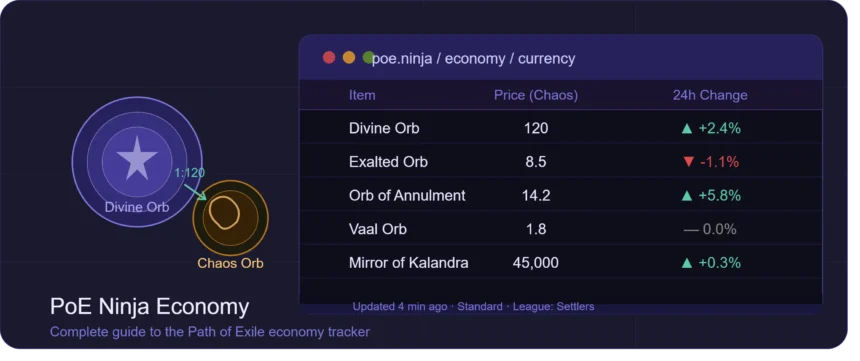
The PoE Ninja economy tracker is the economy section of poe.ninja, a free third-party data aggregation website for Path of Exile. It collects and processes live pricing data from the Path of Exile public stash tab API — the same API GGG provides to approved third-party developers — and organises it into a searchable, filterable dashboard covering every tradeable item category in the game.
Unlike the official Path of Exile trade website (which shows raw player listings), the PoE Ninja economy tracker processes that data. It applies a statistical confidence model to remove outlier prices, price-fixed listings, and manipulated entries, then surfaces a single reliable price for each item that reflects what it actually trades for between real buyers and sellers.
What Does the PoE Ninja Economy Section Track?
The poe.ninja economy section covers every major tradeable item category in Path of Exile 1 and Path of Exile 2:
| Category | What It Covers | Primary Use |
|---|---|---|
| Currency | All orbs, shards, and special currencies | Exchange rates, bulk trading |
| Fragments | Scarabs, map fragments, boss keys | Endgame farming strategy |
| Delirium Orbs | All Delirium Orb variants | Delirium content optimisation |
| Divination Cards | Every div card in the game | Card farming profitability |
| Unique Items | All unique weapons, armour, accessories | Build budgeting, flip targets |
| Skill Gems | Gems at various quality/level thresholds | Gem leveling profit calculation |
| Maps | All map tiers | Atlas strategy, bulk selling |
| Fossils | All Delve fossil types | Crafting cost estimation |
| Essences | All Essence types | Essence farming value |
| Beasts | Bestiary creatures | Einhar content value |
| Artifacts | Expedition currencies | Expedition profitability |
| Oils | All Blight oils | Blight content and anointing |
| Blighted Maps | Blighted and Blight-Ravaged maps | Blight farmin |
How to Access and Use the PoE Ninja Economy Dashboard
Step 1 — Select the Correct League
This is the single most important step every time you open poe.ninja. The economy data is league-specific — an item worth 80 Chaos Orbs in the current challenge league may be worth 5 Chaos in Standard or 200 Chaos in Hardcore SSF. Always use the league dropdown at the top of the site to confirm you are viewing data for the correct active league before acting on any price.
At the start of a new league, wait at least 48 hours before treating economy prices as reliable benchmarks. During the first two days, supply is extremely low, volume is thin, and prices swing wildly. Experienced traders treat early-league poe.ninja data as directional signals, not confirmed prices.
Step 2 — Understand the Data Columns
Every item in the PoE Ninja economy section displays the same core data columns. Here is what each one means and how to use it:
| Column | What It Shows | How to Use It |
|---|---|---|
| Price (Chaos Orbs) | The current confident market price | Your baseline before listing or buying |
| Divine Value | Equivalent in Divine Orbs | Use for high-value item comparison |
| Change (%) | Price movement in the last 24 hours | Rising = consider holding; Falling = sell fast |
| Volume | Number of active indexed listings | Low volume = less reliable price |
| Sparkline (7-day) | Mini price trend graph | Shows the trajectory of the item’s value |
| Listing Count | How many sellers exist right now | Low count = potential supply squeeze |
Step 3 — Click Through to Full Price Histories
Every item on poe.ninja has a detailed price history page accessible by clicking its name. This full graph shows the item’s price over days and weeks of the league, which is far more useful than the 24-hour change percentage alone. Use the full history to:
- Identify manipulation: A sudden vertical spike with no preceding meta shift is almost always a group of players buying up cheap listings. Do not buy into a manipulated spike.
- Time your sales: If an item’s price is trending down steadily, sell immediately rather than waiting for recovery.
- Spot the league cycle pattern: Many items follow a predictable price curve — high in week 1, declining through mid-league as supply increases, sometimes spiking again near league end as players gear final characters.
PoE Ninja Economy — Currency Section Deep Dive
The Currency section is the most-used part of the PoE Ninja economy tracker. It shows the live exchange rate between every currency type and Chaos Orbs, which is the standard unit of measurement in the Path of Exile economy.
Reading the Divine Orb to Chaos Orb Ratio
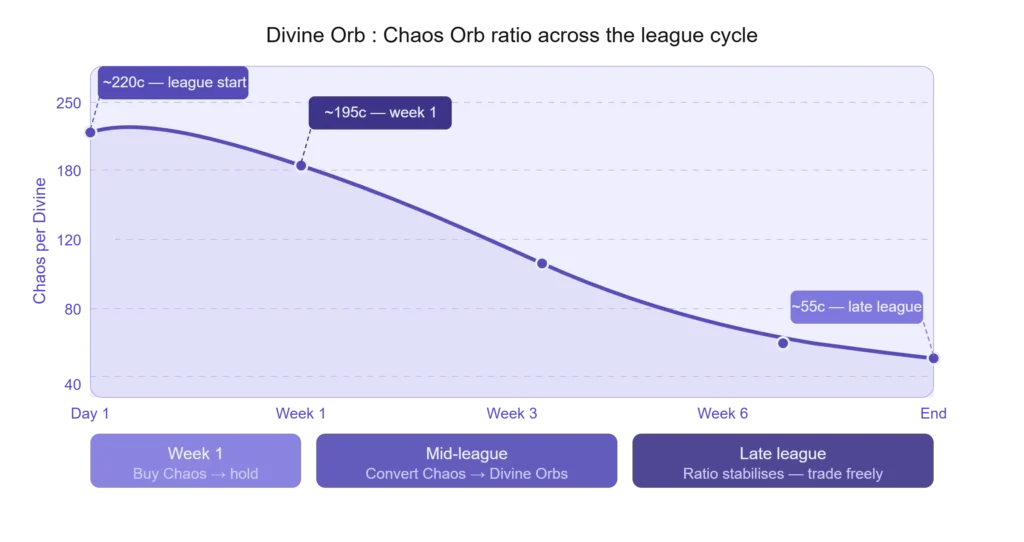
The single most important number in the PoE Ninja currency section is the Divine Orb to Chaos Orb ratio. This ratio tells you how many Chaos Orbs equal one Divine Orb at the current moment — and it changes throughout the league cycle:
- Week 1 (League Start): Divine Orbs are scarce. The ratio is typically very high — sometimes 200:1 or more. Chaos Orbs are plentiful because players are actively using currency while progressing.
- Mid-League: Supply of Divines increases as more players reach endgame. The ratio gradually decreases.
- Late League: The ratio stabilises or continues to fall as the player base shrinks and Divine supply accumulates.
How to use this: If the ratio is currently high and appears to have peaked or is starting to fall, that is a signal to convert your Chaos Orbs into Divine Orbs before the ratio drops further. If the ratio is low and appears to be rising (early-mid league), hold Chaos and wait.
Currency Exchange Rates — Full Overview Table
| Currency Type | Typical Week 1 Value | Typical Mid-League Value | Primary Use |
|---|---|---|---|
| Divine Orb | 150–250 Chaos | 80–150 Chaos | Rerolling top-tier item modifiers |
| Exalted Orb | 5–20 Chaos | 5–15 Chaos | Endgame crafting, some trades |
| Orb of Annulment | 10–30 Chaos | 5–15 Chaos | Removing bad mods during crafting |
| Ancient Orb | Varies | Varies | Rerolling unique items |
| Mirror of Kalandra | Extremely rare | Extremely rare | Duplicating top-tier rare items |
| Orb of Alteration | Very low (bulk value) | Very low | Common item rerolling |
| Vaal Orb | 1–3 Chaos | 1–2 Chaos | Corrupting items for powerful implicits |
| Harbinger currencies | Varies by type | Varies by type | High-end crafting and currency shards |
Note: All values are approximate and vary significantly by league. Always check live data on poe.ninja.
How to Use poe.ninja Currency Data for Bulk Exchanges
Currency bulk trading is one of the fastest ways to accumulate wealth in Path of Exile, and poe.ninja’s currency section is your essential reference. Before executing any large currency exchange:
- Check the current ratio on poe.ninja for the exact currency pair you are trading.
- Compare to the 7-day sparkline — is this ratio near a local high or low?
- Cross-reference with the Path of Exile trade website to find the actual bulk buyers/sellers and confirm the poe.ninja rate is achievable.
- Factor in the spread — large bulk exchanges often happen at a slight discount to the poe.ninja spot price. Build a 3–5% buffer into your expectations.
PoE Ninja Economy — Divination Cards Section (Underrated Goldmine)
The Divination Cards section of the PoE Ninja economy tracker is consistently underused by players who focus only on currency prices. It is arguably the highest-value section for identifying profitable farming strategies at any stage of the league.
How Divination Card Profitability Works
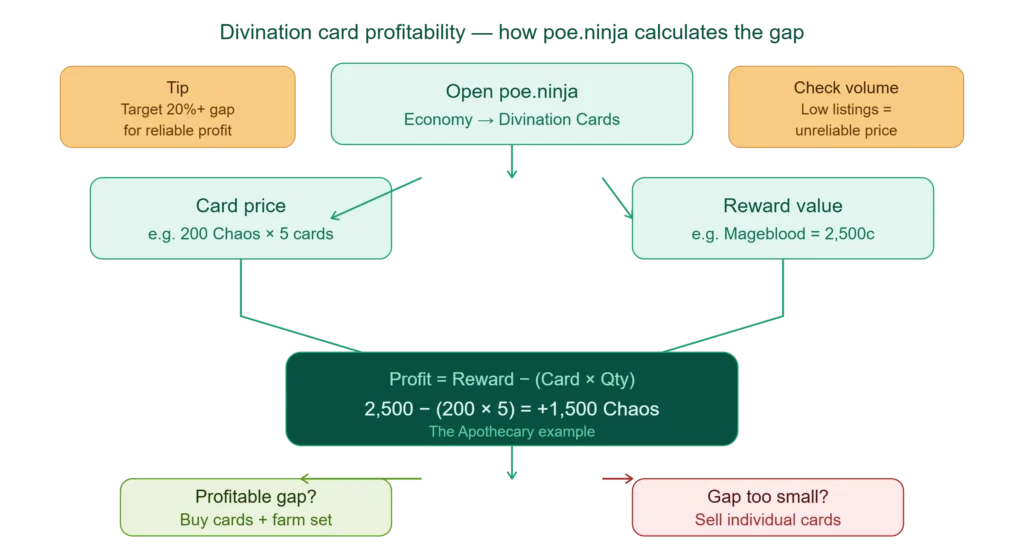
Every divination card set can be turned in to Tasuni (the NPC) for a specific item, currency, or reward. The profit opportunity comes from a gap between the card price and the value of the reward:
Profitability Formula:
Profit = Reward Value − (Card Price × Cards Required)Example calculation:
| Metric | Value |
|---|---|
| Card name | The Apothecary |
| Cards required for set | 5 |
| Individual card price | 200 Chaos |
| Total set cost | 1,000 Chaos |
| Reward (Mageblood unique) | ~2,500 Chaos |
| Net profit per set | ~1,500 Chaos |
poe.ninja shows you both figures side by side — the card price and the reward value — making this calculation instant. Check this section every league to identify which cards are underpriced relative to their reward. These are your target farming cards for that league.
How to Find Your Farming Map Using Div Card Data
Once you have identified a profitable divination card on poe.ninja, the next step is finding which maps drop that card. Use these resources alongside poe.ninja:
- The PoE Atlas and Maps guide to identify drop zones
- poe.ninja’s own card page (click a card) to see its drop location in the hover tooltip
- The Path of Exile wiki for card drop location confirmation
Then use the poe.ninja Maps section to check the current price of the maps that drop your target card, so you can calculate whether it is more efficient to run those maps raw or purchase them in bulk from other players.
PoE Ninja Economy — Unique Items Section
How to Check a Unique Item’s Price on PoE Ninja
- Go to Economy > Uniques on poe.ninja
- Use the item type filter (Weapons / Armour / Accessories / Flasks / Jewels) to narrow the category
- Search by name using the search bar at the top
- Click the item to view its full price history, listing count, and confidence level
Understanding Unique Item Price Confidence
Not all unique item prices on poe.ninja are equally reliable. The volume column is your trust indicator:
- High volume (50+ listings): Price is very reliable. Use it as your listing price directly.
- Medium volume (10–50 listings): Reasonably reliable but check the full price graph for stability.
- Low volume (<10 listings): Treat with caution. The price may be influenced by just one or two listings. Visit the trade site directly to verify.
Highly desirable unique items tied to popular builds will spike rapidly when that build gains popularity. Cross-reference the Builds section of poe.ninja with unique item prices to anticipate spikes before they happen.
How to Identify Undervalued Uniques Using Build Data
This is one of the most powerful cross-section strategies on poe.ninja:
- Open the Builds section and filter by the current most-played skill or ascendancy
- Note which unique items appear most frequently in the gear of top characters
- Go to Economy > Uniques and check the price and trend of those items
- If the price has not yet risen to match the build’s growing popularity, you have identified a buy opportunity before the spike
What Is a PoE Economy Tracker? (And How PoE Ninja Compares)
A PoE economy tracker is any tool that aggregates, processes, or displays Path of Exile market data to help players make informed trading decisions. poe.ninja is the most comprehensive and widely-used example, but several other tools complement it. Here is how the full ecosystem compares:
PoE Economy Tracker Comparison Table
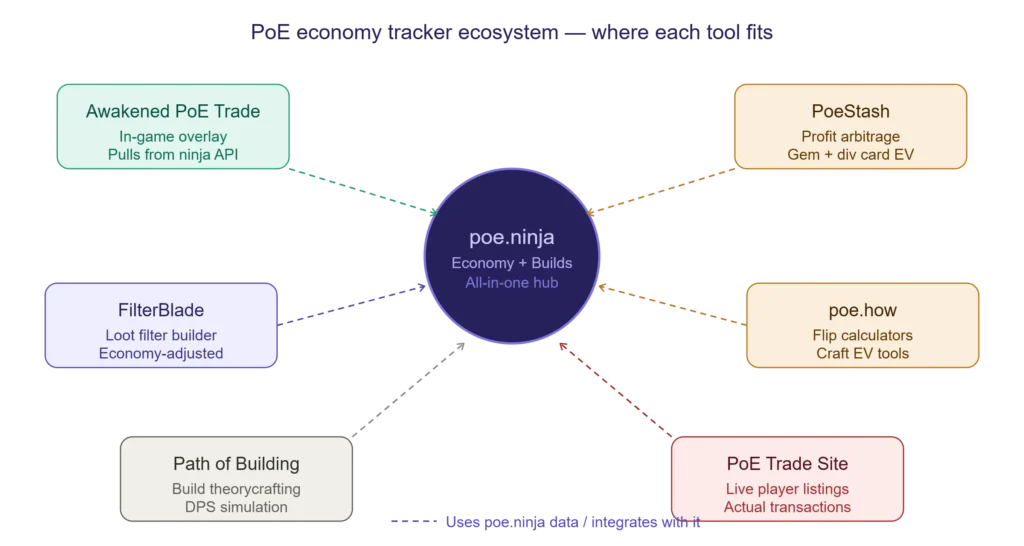
| Tool | Type | Economy Data? | Real-Time? | Best For | Free? |
|---|---|---|---|---|---|
| poe.ninja | Web dashboard | ✅ Full | ✅ Yes (every ~10 min) | All-in-one economy + builds | ✅ Yes |
| Awakened PoE Trade | In-game overlay | ✅ Partial (via ninja) | ✅ Yes | Quick price checks in-game | ✅ Yes |
| PoeStash | Web tool | ✅ Advanced | ✅ Yes | Profit arbitrage, gem leveling | ✅ Yes |
| poe.how | Web tool | ✅ Partial | ✅ Yes | Div card flipping, craft EV | ✅ Yes |
| FilterBlade / NeverSink | Loot filter | ✅ Via ninja API | ✅ Yes (auto-updates) | In-game loot filtering by economy value | ✅ Yes |
| WealthyExile | Web tool | ✅ Partial | ✅ Yes | Bulk currency exchange optimisation | ✅ Yes |
| craftofexile.com | Web tool | ❌ No prices | ❌ No | Crafting simulation and probability | ✅ Yes |
| Path of Building | Desktop app | ❌ No | ❌ No | Build theorycrafting, DPS simulation | ✅ Yes |
PoE Ninja vs Awakened PoE Trade — Which Should You Use?
These two tools serve different use cases and work best together, not as replacements for each other:
- Use poe.ninja for strategic research: checking price trends before a session, evaluating items before listing them, planning farming strategies, and tracking currency exchange rates over time.
- Use Awakened PoE Trade for instant in-game lookups: while you are actively playing and pick up an item, Ctrl+D triggers a quick price check overlay without tabbing out.
Awakened PoE Trade actually pulls its pricing data from poe.ninja’s API, so they are fundamentally using the same source data. The difference is the interface context — browser vs. in-game overlay.
PoE Ninja Economy for Path of Exile 2
poe.ninja fully supports Path of Exile 2 economy tracking with a dedicated section accessible via the game version toggle at the top of the site. As of 2026, the PoE 2 economy section covers:
- Currency Exchange data normalised against Chaos Orbs, Divine Orbs, and Exalted Orbs
- Unique items across 8 categories: Weapons, Armours, Accessories, Flasks, Charms, Jewels, Maps, and Sanctum Relics
- Skill Gems at various quality and level thresholds
- Fragments and endgame access items
Key Differences Between PoE 1 and PoE 2 Economy Tracking
| Feature | Path of Exile 1 | Path of Exile 2 |
|---|---|---|
| Primary high-value currency | Divine Orb | Exalted Orb |
| Data source method | Public Stash Tab API | Currency Exchange + Official Trade API |
| Economy stability | More mature, predictable cycles | Still evolving (Early Access in 2026) |
| Unique item categories | Broader, more established | 8 new categories added in 2025–2026 |
| Patch frequency | Seasonal leagues (quarterly) | More frequent patches in Early Access |
Important: Always confirm which game version you are viewing. PoE 1 and PoE 2 are completely separate economies. An Exalted Orb in PoE 2 has a completely different value from an Exalted Orb in PoE 1. The game version selector at the top of poe.ninja controls this globally — if you do not see the items you expect, check that toggle first.
How to Use PoE Ninja Economy to Build Wealth — Advanced Strategies
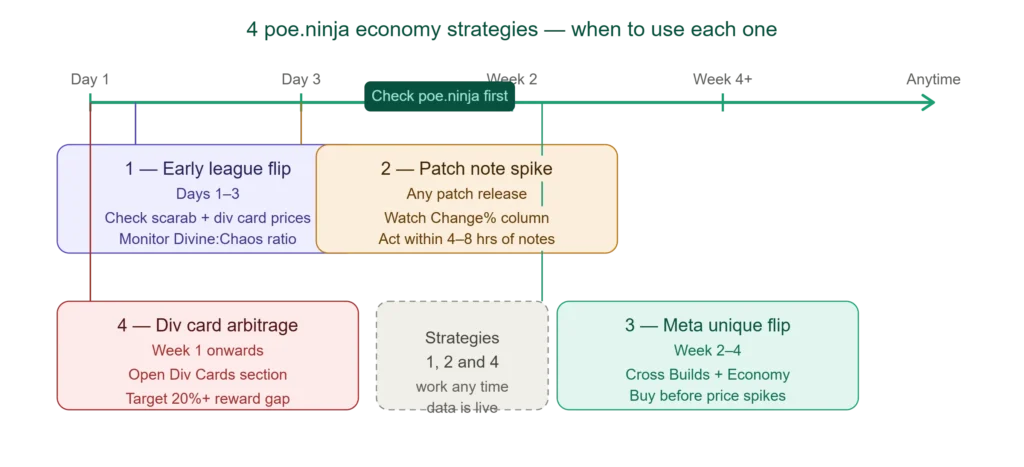
Strategy 1 — The Early League Currency Flip
Timing: First 48–96 hours of a new league
At league start, the poe.ninja economy section is chaotic. Prices spike and crash hourly as supply races to catch up with demand. The opportunity:
- Check the Fragments section for scarab prices — league-specific scarabs are always expensive in the first week
- Check the Divination Cards section for cards that drop from the early game — these are often undervalued because high-level farmers haven’t flooded the supply yet
- Monitor the Currency section for the emerging Divine-to-Chaos ratio — this sets the baseline for all wealth calculations throughout the league
Strategy 2 — The Mid-League Meta Flip
Timing: Week 2–4 of a league, when the meta solidifies
Once top streamers and content creators settle on the dominant builds of a league:
- Track which builds are rising in the Builds section of poe.ninja
- Identify the 2–3 unique items most commonly equipped by those builds
- Check those items in the Economy > Uniques section — if they haven’t spiked yet, buy aggressively
- List them for 15–20% above purchase price once the spike arrives
This strategy requires checking poe.ninja builds data daily for 2–3 days to catch the trend early enough.
Strategy 3 — The Divination Card Bulk Arbitrage
Timing: Any point in the league after week 1
- Open Economy > Divination Cards on poe.ninja
- Sort by highest reward value
- Find cards where the set cost is 20% or more below the reward value (the larger the gap, the better)
- Buy individual cards from the trade site (often sold by players who do not track their value)
- Complete sets and turn them in for the reward item
- Sell the reward item at its full market value
This is one of the most beginner-accessible trading strategies in Path of Exile because poe.ninja shows you exactly which cards have the best arbitrage gaps in real time.
Strategy 4 — Tracking Patch Note Price Impacts
When GGG releases a patch note (especially balance changes), specific items will spike or crash within hours:
- Buffed skill gems → the required unique items for builds using those gems spike immediately
- Nerfed builds → their key unique items crash, sometimes to 5–10% of their former value
- New league mechanics → new currency types and farming targets spike at league start
Use poe.ninja’s Change (%) column and 7-day sparkline immediately after patch notes drop to identify which items are moving. Act within the first 4–8 hours for maximum profit.
PoE Ninja Economy — Common Mistakes to Avoid
- Mistake 1 — Not checking the league dropdown: You are looking at Standard prices while trading in the current challenge league. Always confirm the league selector.
- Mistake 2 — Ignoring volume: A 1,000 Chaos price on an item with 3 listings is not a reliable price. Always check the volume column.
- Mistake 3 — Treating poe.ninja price as the sell price: Real trades often happen 5–15% below the confident price because buyers choose the cheapest online seller. Factor in undercutting.
- Mistake 4 — Acting on early-league prices: The first 48 hours of a league are not representative of stable economy conditions. Treat them as estimates only.
- Mistake 5 — Confusing PoE 1 and PoE 2 data: A missed game version toggle means every single price you see is wrong. Double-check the game version selector on every session.
- Mistake 6 — Buying into manipulation spikes: An item that doubled in price in 6 hours with no meta change is almost certainly being price-manipulated by a small group of players buying up cheap listings. Check the full price history graph and look for an unnatural vertical spike.
- Mistake 7 — Ignoring the Divination Cards section: This is consistently the most overlooked section for profitable farming decisions. Check it every league.
Frequently Asked Questions — PoE Ninja Economy
How often does poe.ninja update economy prices?
Economy prices on poe.ninja update approximately every 10–15 minutes based on incoming data from the public stash tab API. This makes it one of the most real-time economy trackers available for Path of Exile. Currency exchange rates can sometimes reflect within minutes of a major market movement.
Is poe.ninja the only PoE economy tracker I need?
For most players, yes — poe.ninja covers all major item categories with reliable pricing and is the industry standard. However, for specific use cases, combining it with Awakened PoE Trade (for in-game lookups) and PoeStash or poe.how (for advanced arbitrage calculations) gives you a more complete trading setup. See our full PoE Ninja guide for a complete comparison of all PoE economy tools.
Why does poe.ninja show a different price than the trade site?
poe.ninja applies a confidence algorithm to filter out outlier listings (items priced far below or above the normal range, price-fixed bulk listings, etc.) and provides a single market-clearing price. The trade site shows every listing including those that will never sell. poe.ninja’s price is a better estimate of what the item will actually sell for; the trade site’s cheapest listing is the price you need to undercut to be the first sold.
Can I use poe.ninja to track my own wealth?
poe.ninja itself does not have a personal wealth tracking feature — it is a market data tool, not a portfolio tracker. For personal wealth tracking, tools like PoeStash (poestash.com) offer more specific portfolio features built on top of poe.ninja’s pricing data.
Does poe.ninja economy work for SSF leagues?
SSF (Solo Self-Found) leagues do not have a player-to-player economy because trading is disabled. poe.ninja’s economy section is not relevant for SSF since there are no trade prices to track. However, the Builds section of poe.ninja is still very useful for SSF players to understand what skills and passive tree paths are performing well in the current meta.
What is the most important thing to check on poe.ninja before a trading session?
Check two things in order: (1) The Divine Orb to Chaos Orb ratio in the Currency section — this is the foundation of all value calculations in the current league. (2) The Change (%) column for any items you plan to trade — make sure you are not listing a falling item at yesterday’s price or buying an item that has already started declining.
Conclusion — Make PoE Ninja Economy Your Trading Foundation
The PoE Ninja economy section is the most important free tool available to any Path of Exile player who engages with the game’s trading system. It turns the overwhelming complexity of a fully player-driven economy into a clear, navigable dashboard that tells you exactly what every item is worth, where prices are heading, and where the profit opportunities are hiding.
Whether you are a casual player who just wants to make sure you are not getting scammed on a trade, a mid-level farmer calculating divination card profitability, or an experienced trader running arbitrage strategies across hundreds of items — poe.ninja’s economy section has the data you need, updated in near real-time, completely free.
Start every Path of Exile session by opening poe.ninja. Check the currency ratios. Check the prices of items you plan to trade. Check the sparklines of your holds. Five minutes of economy awareness at the start of a session is worth more than an hour of uninformed grinding.
For a broader overview of everything poe.ninja offers beyond the economy section — including the Builds tracker, how the data is sourced, and a full comparison with other PoE tools — read our complete PoE Ninja guide for 2026.

Luke Yapz is a passionate ARPG player and gaming content creator focused on Path of Exile (PoE), Path of Exile 2 (PoE 2), and poe.ninja. He enjoys digging into builds, game mechanics, economy trends, and player data to help the PoE community make smarter decisions.
Through practical guides, insights, and hands-on experience, Luke aims to make complex PoE systems easier to understand—whether you’re improving a build, keeping up with the economy, or looking for useful data to gain an edge.