
Introduction: What is the Path of Exile Trade Website?
The Path of Exile trade website is the official online marketplace where millions of PoE players buy, sell, and exchange in-game items using the game’s player-driven economy. Whether you are searching for a rare Rare weapon, Unique jewel, or bulk currency like Chaos Orbs and Divine Orbs, the Path of Exile trade website (trade pathofexile ) is the primary hub for all trading activity in both Path of Exile 1 and Path of Exile 2.
Understanding how the Path of Exile trade website works — and how to use it effectively — is one of the most important skills any PoE player can develop. In this complete guide, we will walk you through everything: from accessing and navigating the official trade site, to advanced search filters, to bulk trading, common mistakes, and the best third-party tools that work alongside it.
Why the Path of Exile Trade Website Matters
Path of Exile is built around a deeply complex economy. Unlike games with auction houses, PoE trading is entirely player-to-player — there is no in-game automated marketplace. The Path of Exile trade website bridges this gap by indexing every item listed in public stash tabs across all active leagues, making them searchable in real time.
Here is why knowing how to use the PoE trade website is essential:
- Gear progression: Buying specific items with the right mods is often 10x faster than farming them yourself.
- Currency exchange: Trade site bulk currency tools let you convert Chaos Orbs, Divine Orbs, Exalted Orbs, and league-specific currencies at live market rates.
- Build enabling: Unique items that enable specific builds are often only obtainable via the trade website.
- Economy participation: Flipping items, crafting for profit, and sniping underpriced listings all rely on mastering the trade site.
The Official Path of Exile Trade Website: pathofexile
The official Path of Exile trade website is located at pathofexile. It is maintained directly by Grinding Gear Games (GGG) and covers both Path of Exile 1 and Path of Exile 2 leagues.
How to Access the PoE Trade Website
- Open your browser and go to pathofexile.
- Select your game version: Path of Exile 1 or Path of Exile 2.
- Choose the active league (e.g., Standard, Hardcore, or the current challenge league).
- Use the search interface to find items by name, base type, or mods.
Key Sections of the Official Trade Site
| Section | Purpose | Use Case |
| Item Search | Search all listed items with detailed filters | Finding weapons, armor, jewels, flasks |
| Bulk Item Exchange | Trade currencies and bulk items efficiently | Converting Chaos to Divine Orbs |
| Divination Cards | Locate specific divination card listings | Completing card sets for target items |
| Maps & Fragments | Find map tiers and atlas fragments | Atlas progression and endgame prep |
| Gems | Search skill gems by level, quality, corrupt | Optimizing builds with specific gems |
How to Use Path of Exile Trade Website Search Filters
The power of the Path of Exile trade website lies in its search filters. Knowing how to use them correctly separates experienced traders from beginners who overpay or miss great deals.
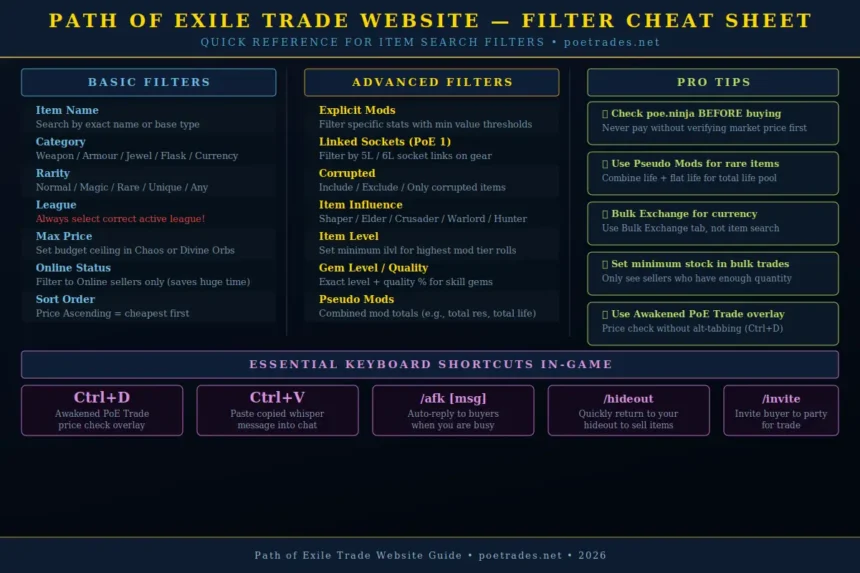
Basic Search Filters
- Item Name: Search by exact name (e.g., ‘Kaom’s Heart’) or base type (e.g., ‘Jewelled Foil’).
- Item Category: Filter by weapon, armour, flask, jewel, currency, etc.
- Rarity: Normal, Magic, Rare, Unique, or any rarity.
- League: Always select the correct active league — items listed in other leagues are not tradeable to you.
- Price: Set a maximum price in Chaos Orbs or Divine Orbs to find affordable listings.
Advanced Search Filters
- Explicit Mods: Filter for specific stat rolls, such as ‘+100 to maximum life’ or ‘% increased fire damage’.
- Minimum Values: Set minimum thresholds so only items meeting your stat requirements appear.
- Linked Sockets: Filter by socket count and links — critical for finding 5L or 6L items in PoE 1.
- Corrupted: Include or exclude corrupted items depending on your need.
- Influenced: Filter by item influence type: Elder, Shaper, Crusader, Warlord, Hunter, Redeemer.
- Item Level: Filter for minimum item level, which affects the possible mod tiers.
How to Read a Trade Listing on the PoE Trade Website
| Listing Element | What It Means | Why It Matters |
| Item Name | The base type or unique name of the item | Tells you exactly what you are looking at |
| Price | The asking price in Chaos or Divine Orbs | Compare against poe.ninja to judge fair value |
| Seller Account | The PoE account name of the lister | Used to track trade reputation informally |
| Online Status | Green = online, grey = offline | Prioritize online sellers for faster trades |
| Listed Time | How long ago the item was listed | Old listings may be already sold or abandoned |
| Whisper Button | Generates the in-game trade whisper message | Click to copy and paste directly into PoE chat |
Using the Bulk Item Exchange on the Path of Exile Trade Website
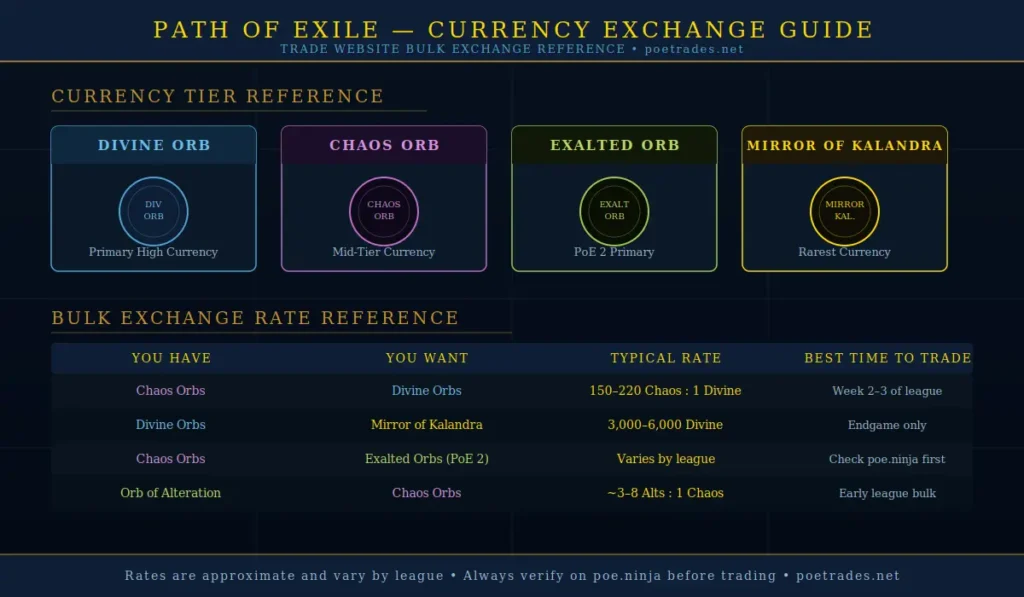
The Bulk Item Exchange section of the trade website is one of the most powerful and underused features among newer players. Instead of searching for individual items, you select what you want to receive and what you have to offer — the site then shows you sellers who have that exact trade available.
Step-by-Step: How to Use Bulk Exchange
- Go to pathofexile and click ‘Bulk Item Exchange’.
- In the ‘I Want’ section, select the currency or item you want to receive (e.g., Divine Orbs).
- In the ‘I Have’ section, select what you are paying with (e.g., Chaos Orbs).
- Set a minimum stock value so you only see sellers with sufficient quantities.
- Click Search to see all live offers.
- Click the Whisper button next to a listing and paste the message in PoE chat.
- Trade and repeat as needed.
Pro Tip: Always sort bulk exchange results by ‘stock’ in descending order when buying large quantities — this ensures the seller has enough to fill your full order in one trade.
How to Buy Items on the Path of Exile Trade Website
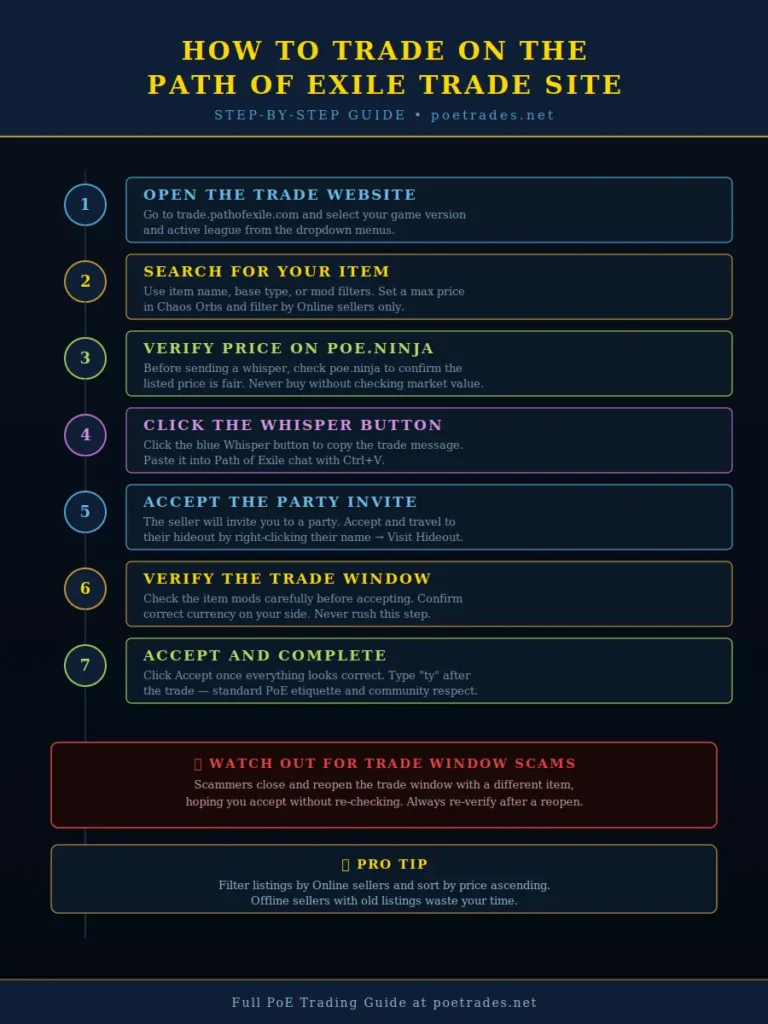
Buying items efficiently is a skill. Here is the full process from search to completed trade:
Step 1 — Find Your Item
Use the search filters described above. Narrow your results by the mods you need, your price ceiling, and whether the seller is currently online. Sort by price ascending to find the cheapest listings first.
Step 2 — Check the Price Against Market Value
Before sending a whisper, check poe.ninja to verify that the listed price is reasonable. If a listing is 50% below market value, the item may already be sold — or it may be a snipe opportunity. Never overpay for items you can find cheaper with a slightly broader search.
Step 3 — Send the Trade Whisper
Click the blue Whisper button on the listing. This copies a pre-formatted trade request message to your clipboard. Paste it into your in-game chat with Ctrl+V. The message includes the item name, price, and the seller’s account name so the game can process it automatically.
Step 4 — Wait for the Party Invite
The seller will invite you to a party. Accept the invite and travel to their hideout by right-clicking the seller’s name in your party panel and clicking ‘Visit Hideout’. Do not spam the seller — wait at least 60 seconds before sending a follow-up if they do not respond.
Step 5 — Complete the Trade Window
Once you are in the seller’s hideout, wait for them to open a trade request. When the trade window opens:
• Verify the item in the trade window matches what you searched for.
• Check the mod values match your requirements (hover over the item).
• Verify the correct currency amount is placed on your side.
• Accept the trade only when everything looks correct.
Warning: Never accept a trade if the item has been swapped to something different from what you agreed upon. Trade window scams involve closing and reopening the trade with a different (usually lower-value) item hoping you will not notice.
How to Sell Items on the Path of Exile Trade Website
Selling items requires some setup in the game client, since the trade website indexes your stash — it does not allow you to manually post listings externally.
Setting Up Your Stash Tabs for Trading
- Purchase a Premium Stash Tab (or Premium Stash Tab Bundle) from the Path of Exile in-game store.
- In your stash, right-click the tab name and choose ‘Make Public’.
- Right-click any item in the tab and select ‘Set Price’ to add a listing price.
- Choose a price type: Exact price (fixed), Negotiable price, or Bulk exchange pricing.
Pricing Your Items Correctly
Pricing is the most important part of selling. Use these strategies:
- Use poe.ninja: Check the market price for unique items, currency, and popular rares.
- Undercut slightly: Price your item 5-10% below the cheapest similar listing to sell faster.
- Avoid bulk tab dumps: Overloading a public tab with hundreds of low-value items wastes your stash space and buyer attention.
- Update prices regularly: League economies shift rapidly. An item priced at 20c at league start may be worth 2c two weeks later.
Responding to Trade Whispers
- When a buyer whispers you in-game, follow this process:
- Finish your current combat or activity (buyers understand — do not rush into a boss fight response).
- Type /afk if you need time: this sends an automatic message letting buyers know you are busy.
- Invite the buyer to your party when ready.
- Move the item from your stash to your inventory so it is ready.
- Open a trade window with the buyer and place the item.
- Confirm the correct currency is in the trade window before accepting.
Common Mistakes Players Make on the Path of Exile Trade Website
| Mistake | Why It Happens | How to Avoid It |
| Wrong league selected | Forgetting to switch leagues after a new season starts | Always check the league dropdown before searching |
| Ignoring offline listings | Messaging offline sellers who listed weeks ago | Filter by ‘Online’ status first |
| Overpaying for items | Not checking poe.ninja before buying | Always verify price against market data |
| Trade window scam | Not verifying item mods after the trade is reopened | Re-check every item in the trade window before accepting |
| Stash tab not public | Items not showing up in search results | Right-click tab name and confirm it is set to Public |
| Currency not prepared | Splitting currency stacks during the trade | Prepare exact currency amounts before the buyer arrives |
| Lowball spam | Trying to negotiate on clearly-priced listings | Only negotiate on expensive items or listings marked as negotiable |
Best Third-Party Tools That Work With the Path of Exile Trade Website
The official trade website is powerful, but a number of community-built tools make the trading experience significantly faster and more efficient. All of the tools below are approved and widely used by the PoE community:
1. Awakened PoE Trade
Awakened PoE Trade is a desktop overlay application that lets you check item prices instantly while playing. Press Ctrl+D on any item in your inventory to get an immediate price range pulled directly from the trade website. It also gives you the whisper button without needing to alt-tab to your browser.
2. PoE Overlay (Overwolf)
PoE Overlay is an in-game overlay that displays trade information, item stats, and live market prices without leaving the game. It integrates directly with the Path of Exile trade website’s API.
3. poe.ninja
poe.ninja is not a trade platform but it is the most important companion tool for using the trade website intelligently. It tracks the real-time market price of every unique item, divination card, currency, and map in every active league, updated every few hours. Always reference poe.ninja before buying or listing expensive items.
4. WealthyExile
WealthyExile focuses on bulk trading and profit identification. It helps players find arbitrage opportunities between different currency types and identifies which items are being listed below market value, making it useful for currency flipping and sniper builds.
Tool Comparison Table
| Tool | Type | Best For | Requires Alt-Tab? | Free? |
| pathofexile | Official Website | All trading | Yes | Yes |
| Awakened PoE Trade | Desktop Overlay | Quick price checks | No | Yes |
| PoE Overlay (Overwolf) | In-game Overlay | Real-time trading | No | Yes |
| poe.ninja | Price Tracker | Market valuation | Yes | Yes |
| WealthyExile | Bulk Trader | Currency flipping | Yes | Yes |
Path of Exile 2 Trade Website: What Has Changed?
Path of Exile 2 launched in Early Access and introduced significant updates to how trading works. The trade website for PoE 2 is accessed at the same domain (pathofexile) but under the PoE 2 game selection.
Key Differences in PoE 2 Trading
- New item bases: PoE 2 introduces entirely new weapon and armour categories with different mod pools.
- Rune system: Runes replace some socket mechanics, changing what players search for on the trade site.
- Waystone trading: Maps are now called Waystones and are commonly traded for endgame atlas progression.
- Auction house in development: GGG has confirmed an in-game auction house is planned for PoE 2 — but as of 2026, the external trade website remains the primary method.
- Whisper trading still required: Like PoE 1, completing trades still requires in-game whisper messaging and manual exchange.
Action Plan: How poetrades.net Can Rank for PoE Trade Keywords
- Target long-tail variants first: Rank for ‘how to use path of exile trade website’, ‘path of exile trade website guide 2026’, and ‘poe trade website filters explained’ before targeting the head keyword.
- Fix on-page technical issues: Repair broken tables, add meta descriptions to every post, and implement schema markup using JSON-LD.
- Expand content depth: This current article (targeting the main keyword) should be your flagship pillar page — link all trade-related articles back to it.
- Build topical authority: Publish a cluster of supporting articles — PoE 2 trade guide, bulk currency exchange guide, Awakened PoE Trade setup, poe.ninja price checking guide. Each one strengthens the site’s topical authority.
- Improve E-E-A-T signals: Replace generic author names with real author bios, include playtime/experience credentials, and add ‘last updated’ dates to all articles.
- Add unique value: Include original screenshots of the trade website interface, video embeds of trading tutorials, and league-specific price data that larger sites do not update frequently.
- Build backlinks: Reach out to PoE Discord servers, Reddit communities (r/pathofexile), and gaming blogs for guest posting and link opportunities.
Path of Exile Trade Etiquette and Community Rules
The PoE trading community has developed a strong set of unwritten rules. Violating them can get you blocked, reported, or excluded from trades:
- The buyer travels to the seller: Always travel to the seller’s hideout — never ask a seller to come to you.
- One whisper, then wait: Send one trade whisper and wait at least 60 seconds before any follow-up.
- Do not spam messages: Sending multiple whispers rapidly is considered rude and will often result in being ignored.
- Negotiate only on negotiable items: If a price is listed as fixed, do not lowball. Negotiating is acceptable only on expensive items or listings marked ‘offer’.
- Do not skill in hideouts: Triggering skills or effects in someone’s hideout during a trade is considered disrespectful.
- Verify before accepting: Always double-check item mods and currency before clicking Accept — never blame the seller for your own error.
- Thank the other party: A simple ‘ty’ after the trade is standard PoE etiquette and builds your reputation.
Frequently Asked Questions About the Path of Exile Trade Website
Is the Path of Exile trade website safe to use?
Yes. The official trade website (trade.pathofexile.com) is operated directly by Grinding Gear Games and is completely safe to use. Third-party tools like Awakened PoE Trade and poe.ninja are also widely trusted by the community. Never share your account password or login credentials on any trade site.
Why can’t I find my item on the trade website?
The most common reason is that your stash tab is set to ‘Private’ instead of ‘Public’. Right-click your stash tab name in game and confirm it is set to Public. Also ensure you have a Premium Stash Tab — regular stash tabs cannot be made public.
How long does it take for a listed item to appear on the trade website?
Items typically appear on the trade website within a few minutes of being listed in a public stash tab. However, during high-traffic periods (such as league launch day), indexing can take up to 15 minutes.
What is the difference between Chaos Orbs and Divine Orbs on the trade site?
Both are the primary trading currencies in Path of Exile. Chaos Orbs are the lower denomination — used for items worth less than approximately 50-200c depending on the league economy. Divine Orbs are the higher denomination and are used for expensive items. The exact exchange rate between them fluctuates by league and can be checked at any time on poe.ninja.
Can I trade in Path of Exile without using the trade website?
Technically yes — you can use the in-game trade chat channel, Discord servers like PoE Trading, or ask in guild chat. However, the trade website is vastly more efficient. For solo self-found (SSF) leagues, trading is disabled entirely by design.
Does the Path of Exile trade website work for Path of Exile 2?
Yes. The same trade website covers both PoE 1 and PoE 2. Select your game version from the dropdown menu at the top of the page. Items from different game versions are not interchangeable.
Conclusion
The Path of Exile trade website is one of the most powerful tools available to any PoE player. Mastering its search filters, understanding the bulk exchange system, knowing the right etiquette, and pairing it with tools like poe.ninja and Awakened PoE Trade will dramatically improve both your gear quality and your in-game economy participation.
For players looking to go deeper, this guide pairs with our other resources: the PoE 2 trading guide, the bulk currency exchange walkthrough, and the full Awakened PoE Trade setup tutorial — all available on poetrades.net.
Whether you are a new exile just starting out or a veteran trader looking to optimize every transaction, the Path of Exile trade website remains the definitive platform for player-to-player trading in the game.

From filling notebooks with stories as a young girl to creating lines of folders filled with files now, writing has always been my passion. While it was a video game that inspired me to craft my own stories, develop characters, settings, interactive mechanics, and even a magic system when I was young, it wasn’t until 2020 that I accepted what I had been doing for years was professionally called game writing.