
Path of Exile (PoE) is well-known for its unique trading system. The Poe Trade site is where you can sell and buy equipment and other in-game items, but it’s not easy to navigate nor does it have much personality. Knowing how to use Poetrade effectively is a crucial piece of knowledge that all players should acquire, as it provides access to better gear and unique items. Here are the steps to trading on Poe Trade.
1. Understanding Poetrade Basics
Poe Trade is a community-driven market platform where players have the opportunity to list their own items, search for specific items, and access other players’ inventories to make transactions directly.
Your search filters determine which items you see. You can browse millions of items listed by other players. Select the best deal based on price, quality, rarity, links, and mods.
Poe Trade can be accessed via the official Path of Exile Trade website. It is worth noting that the built-in trading system is only available with the Premium Stash Tab.
2. Setting Up Your Trade: Listing Items for Sale
Premium Stash Tabs:
To trade effectively on PoE, you require a Premium Stash Tab that enables you to list items for sale without hassle. Here’s how you can do it:
- Buy a Premium Stash Tab: You can purchase Premium Stash Tabs in the store or on your account page.
- Put the Item into Stash: Make Sure to put the item in your Premium Stash Tab.
- Make Public: After adding the item to the tab, set it to “Public” for trade.
- Price the Item: Specify a price, via typing in an amount of currency (e.g., “Chaos Orbs” or “Exalted Orbs”) and clicking on “Buyout Price”. This way, other players can view your listing and contact you if they are interested in trading.
After your item is posted, it can be seen by anyone visiting the Poe Trade site.
3. Searching for Items on Poe Trade
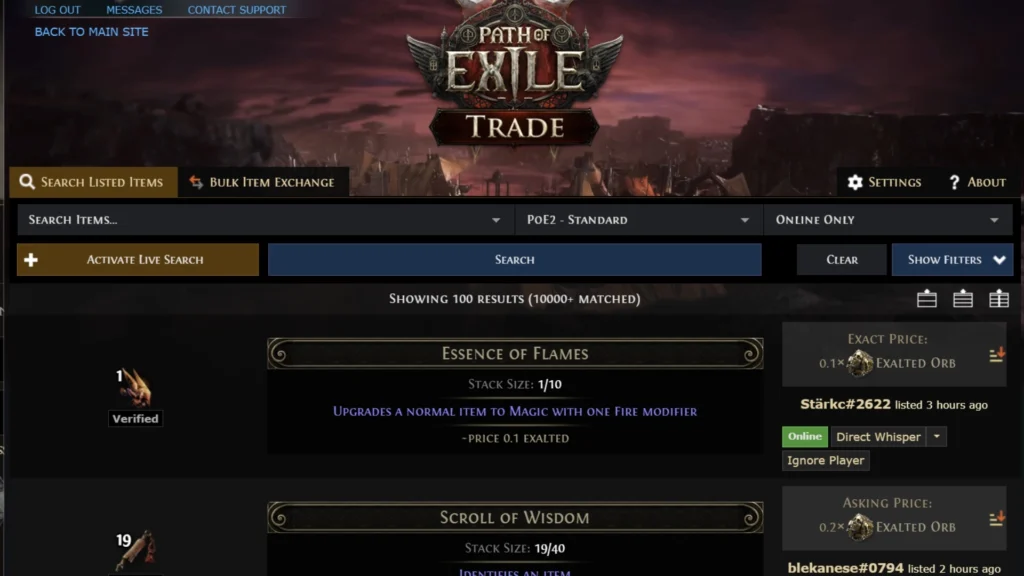
These filters make it easier to quickly find the items that suit your build and budget, reducing time spent sifting through irrelevant results.
Apply filters on Poe Trade to refine your search and quickly find what you need. Follow these steps:
Filters:
- Item Type: Filter by weapons, armor, accessories, etc.
- Mods and Stats: Search for specific stats or mods.
- Price Range: Set a minimum and maximum price in the specified currency.
- Online Status: Show only listings by online players.
- Item Level & Rarity: Filter by desired level or rarity.
Use these filters to quickly find items for your build and save time.
4. Using Advanced Filters for Precision
To narrow down your search results even further, Poetrade offers a variety of advanced filter options. Here’s a look at some of the main filters that you could use to search for items:
Weapon Filters
- Damage: Filter weapons by specifying minimum and maximum damage values.
- Attacks per Second: Filter weapons by setting a desired attack rate range.
- Critical Chance: Filter for weapons by setting minimum or maximum critical chance values.
- DPS: Sort based on DPS value to look for weapons with the strongest performance.
- Physical & Elemental DPS: Set separate ranges to filter for physical or elemental DPS values as needed.
Armor Filters
- Armour, Evasion, and Energy Shield: Specify the minimum and maximum values for each of these stats to find armor with the right defensive properties.
- Ward and Block: Filters for additional defensive capabilities such as ward and block chance.
Socket and Link Filters
- Sockets: Search for sockets by any combination of color (Red, Green, Blue, White) or by CP Cost to refine your results.
- Links: Filter items by the number of linked sockets needed for your build.
Requirements Filters
- Level: Set a minimum and maximum item level to find desired items.
- Strength, Dexterity, Intelligence: Filter items based on required Strength, Dexterity, or Intelligence to match your character attributes.
Map Filters
- Map Tier, Packsize, and Item Quantity/Item Rarity: Find maps by specifying Tier, Packsize, Item Quantity, or Item Rarity.
Heist Filters
- Wings Revealed: Filter Heist contracts by the number of wings or escape routes unlocked.
- Contract Objective Value: Filter Heist contracts by desired objective value.
Sanctum Filters
- Resolve and Inspiration: Filter Sanctum runs based on Resolve and Inspiration.
- Aureus: Filter based on Aureus currency drops from the Hall of Sanctum..
Miscellaneous Filters
- Item Level, Quality, and Gem Level: Additional filters for those seeking high-quality or high-level items and gems.
- Corrupted, Identified, Mirrored: Select items based on their specific characteristics, like whether they’re corrupted or mirrored.
- Talisman Tier, Alternate Art: If you are looking for special editions or specific talismans, these filters are perfect for finding unique items.
Trade Filters
- Sale Type: Use ‘Buyout/Fixed Price’ to find listings with fixed prices.
- Seller Account: Search by account name to buy from a specific player.
These filters help you quickly find what you need and save you time by narrowing down your search results to relevant categories.
5. Making a Trade: How to Buy Items
Once you find an item that fits your needs, you can initiate the trade process:
- Contact the Seller: Begin with an inquiry (Press whisper) about the item, then pay for your purchase after knowing the details of shipping costs, shipment time, and Final Price. This will send an SMS to the seller directly in-game.
- Trade Negotiations: You and the seller agree on a final price as well as any other terms for the trade.
- Party Invite: When the seller accepts your offer, they will send you a party invitation. Take the invitation to accept there for the trade.
- Trade Window: A trade window will open, where both you and the seller must place the items or currency..
- Confirm and Complete the Trade: After both sides have placed their items in the window, double-check them and then click on the accept button.
6. Making a Trade: How to Sell Items
So when selling things, it’s the same as buying, but reversed:
- Initiate the Trade: When a customer whispers to you for one of your items, invite them to a party.
- Set up the Trade Window: Enter the item and the agreed-upon price.
- Confirm the Trade:You may ask the other player whether they agree with your offer, and when they do, you can accept and proceed with the business.
7. Tips for Successful Trading
1. Avoid Scams
Scams are a frequent occurrence in online trading. Here are some tips for avoiding scams:
- Remember to look over items traded before hitting the OK button.
- Don’t trust players who promise “better deals” after the trade has been made; always complete the deal within the trade window.
- Item switching – Be careful about item switching; the seller might replace it with an entirely different item right before confirmation.
2. Pricing Strategy
It’s very important to be competitive when pricing yours:
- Research the Market: Search poetrade for current prices on your items. Watch demand and supply shifts, and adjust your prices accordingly.
- Undercut the Competition: To sell quickly, set your price slightly below similar items.
- Bundle Items: When selling in bulk, offer items together, such as all four pieces of rare gear, since buyers often seek multiples.
3. Using Third-Party Tools
A number of third-party extensions can help enhance your trading experience:
- Awakened Poetrade: Is a trusted tool for checking prices, creating custom searches, and viewing live currency values. It’s especially helpful for bulk trades.
- PoE Ninja: Track the value of in-game currencies and popular items to understand price trends.
8. Conclusion
Trading on Poe Trade in Path of Exile is essential for improving your character. To get better equipment, move your unwanted items, or exchange currency, Poetrade is the most effective tool to help you grow stronger.
By using the proper trading strategies, you can use Poe Trade to get to the endgame in no time at all.
Through sophisticated filters and custom searches, you’ll be able to find what you want fast — because time is money. Keep these tips in mind and check the market trends, and you’ll be a trading pro of Path of Exile in no time.