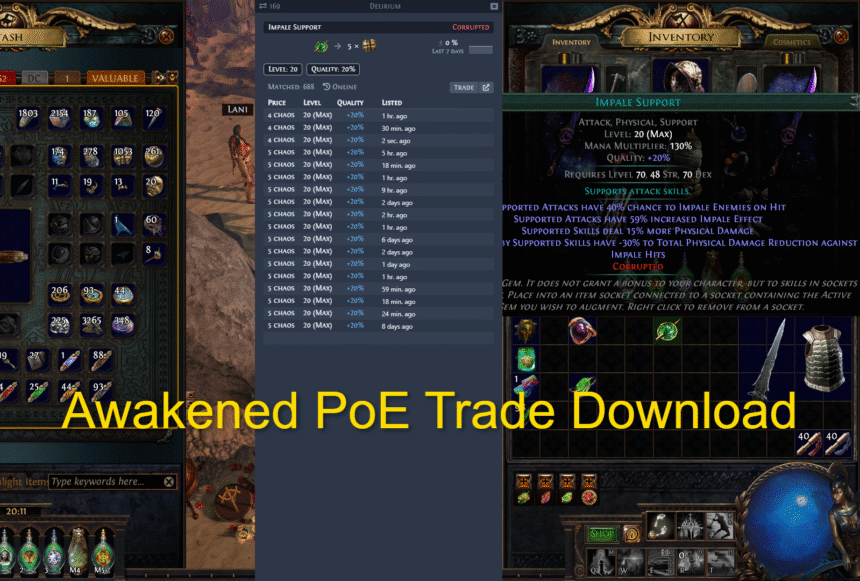
You can safely download Awakened PoE Trade from its official website or GitHub releases page. Just choose the right file for your system (Windows, Linux, or macOS), install it, then run it while Path of Exile is open to start price-checking your items.
If you’re tired of guessing item prices in Path of Exile, Awakened PoE Trade is your new best friend. It’s a free tool that helps you check prices, read item stats, and trade faster without breaking a sweat.
What Is the Awakened PoE Trade?
Awakened PoE Trade is a small helper app for Path of Exile. It works with the item text your game copies when you press Ctrl + C on an item.
With it, you can:
- Price-check items quickly
- See item stats and rolls in a neat window
- Copy and search item info more easily
In simple words: it saves your time, saves your clicks, and saves your nerves when dealing with trading. Instead of “flying blind,” you get clearer info in seconds.
Safe Places to Download Awakened PoE Trade
First things first: only download from trusted sources. That’s rule number one.
Here are the main safe options:
- Official website
- Search in your browser: Awakened PoE Trade download
- Open the site with the official project (usually snosme.github.io or linked from there).
- Search in your browser: Awakened PoE Trade download
- GitHub releases page
- Search: SnosMe Awakened PoE Trade GitHub
- Open the releases section and download the latest version for your system.
- Search: SnosMe Awakened PoE Trade GitHub
- Official mirrors (optional)
- Sometimes there are mirrors (like SourceForge) linked from the official page or GitHub.
- Use them only if they clearly point back to the same project.
- Sometimes there are mirrors (like SourceForge) linked from the official page or GitHub.
Avoid random websites you’ve never heard of. Better safe than sorry.
Is Awakened PoE Trade Safe?
Short answer: generally yes, if you download it from the official sources.
- It is an open-source tool, meaning the code is public and can be checked by anyone.
- It has been used by many PoE players for a long time.
Still, use common sense:
- Keep your antivirus or Windows Defender on.
- Only download from the official website or GitHub.
- If something feels off, double-check the file or wait for updates.
Awakened PoE Trade Download for Windows 10 & Windows 11
Most players are on Windows, so let’s start there.
Step 1: Go to the official download page
- Open your browser.
- Search for: Awakened PoE Trade download
- Click the result that points to the official project website.
Step 2: Download the Windows version
On the download or releases page:
- Find the Windows build (usually a .exe installer).
- Download the latest version (highest version number).
Step 3: Run the installer as administrator
- Right-click the downloaded file.
- Click “Run as administrator”.
- Follow the usual steps: Next → Next → Finish.
This gives the tool the access it needs to read your game window properly.
Step 4: Start Path of Exile, then Awakened PoE Trade
- Open Path of Exile first.
- Then start Awakened PoE Trade from the Start menu or desktop shortcut.
If everything went well, it’s ready to use.
Awakened PoE Trade for Windows 7
If you’re still on Windows 7, the main project may not fully support it, but there is a special fork made for Win7 users.
Basic steps:
- Search: awakened poe trade win7
- Open the GitHub repo made for Windows 7.
- Go to its Releases section.
- Download the latest Windows 7 build and install it the same way (run as administrator, follow the installer steps).
It’s not the main branch, but it helps older systems keep up with the game.
Awakened PoE Trade Download for Linux
On Linux, you have a couple of common options.
Option 1: AppImage (or similar) from GitHub
- Go to the official GitHub releases for Awakened PoE Trade.
- Download the Linux/AppImage file.
Make it executable, for example:
chmod +x Awakened-PoE-Trade-*.AppImage
- Run that file while Path of Exile is running (for example through Steam/Proton).
Option 2: Distro-specific packages (for example: Arch Linux)
Some Linux distros have community packages, like an AUR package on Arch (awakened-poe-trade-git or similar).
- Use your AUR helper (yay, paru, etc.).
- Install the package.
Remember, these are community maintained, so read comments and instructions carefully.
Awakened PoE Trade Download for macOS
If you’re on macOS (Intel or Apple Silicon), here’s what you usually do:
- Go to the official website or GitHub releases page.
- Download the macOS .dmg file (often named something like Awakened-PoE-Trade-<version>-universal.dmg).
- Open the .dmg and drag the app into your Applications folder.
Sometimes macOS can be picky:
- If double-clicking the app doesn’t show the overlay, you can:
- Right-click the app → Show Package Contents
- Go to Contents/MacOS
- Run the file there (a terminal window may open) while PoE is running
- Then switch back to the Path of Exile window
- Right-click the app → Show Package Contents
That little trick can help when macOS security or permissions get in the way.
First Steps After Installing Awakened PoE Trade
Once Awakened PoE Trade is installed and running with the game, here’s how to get started.
1. Test a simple price check
- Hover over an item in your inventory or stash.
- Press Ctrl + C.
- Awakened PoE Trade should pop up with an item window, showing details and price info.
If it works, you’re already halfway there.
2. Set your league and language
In the app’s settings:
- Choose your current league (for example, the current trade league or Standard).
- Set the language to match your game language.
This helps the tool read items correctly and search in the right markets.
3. Learn the main hotkeys
Check the hotkeys/chord settings in the app. Important ones:
- Price check hotkey
- Extra info / advanced search hotkey
- Any special key you want to change
You can customize them to fit your playstyle. Once you know your hotkeys, using the tool becomes second nature.
Common Problems and Simple Fixes
Even the best tools act up sometimes. Here are some common issues and quick fixes.
Problem 1: “The overlay does not show up”
Try this:
- Make sure Path of Exile is already running before you open Awakened PoE Trade.
- On Windows, run Awakened PoE Trade as administrator.
- Set Path of Exile to Windowed or Borderless Windowed mode, not exclusive fullscreen.
Overlays often struggle with pure fullscreen modes.
Problem 2: “My antivirus warns about the file”
This can happen with small or less-known apps.
- If you downloaded from the official website or GitHub, it’s often just a false positive.
- You can scan the file with multiple scanners if you want extra peace of mind.
- If you’re still unsure, wait for a newer version or check community feedback.
Better to double-check than to regret it later—that’s just good digital hygiene.
Problem 3: “It stopped working after a game update”
When Path of Exile gets a big update or a new league:
- Check the official download/GitHub page for a newer version of Awakened PoE Trade.
- Download and install the latest release.
- Restart both the game and the app.
Many issues vanish once you’re on the newest version.
Tips to Use Awakened PoE Trade Like a Pro
Here are a few handy tips so you get the most out of it:
- Don’t guess, check. Before you vendor or delete items, do quick price checks, especially on rares and uniques with good rolls.
- Use it while mapping. A fast check in the middle of a map lets you decide: keep, sell, or leave it.
- Combine it with other tools. Many players use Awakened PoE Trade along with Path of Building, loot filters, and other utilities.
As the saying goes, “Work smarter, not harder.” Awakened PoE Trade is exactly that: a smart helper for your loot.
Short FAQ – Awakened PoE Trade Download
Q: Is Awakened PoE Trade free?
Yes, it’s completely free to use. It’s an open-source project made for the PoE community.
Q: What is the safest place to download it?
From the official website or the official GitHub releases page. Avoid random third-party sites.
Q: Does it work with Path of Exile 2?
Support for PoE 2 is still evolving. Check the official project page or related forks for the latest info. Over time, more PoE 2–specific features and tools will appear.
Q: Do I need to run it as an admin on Windows?
It’s recommended to run it as administrator so it can correctly read your game window and handle hotkeys.
Q: Can I get banned for using it?
Awakened PoE Trade works by reading the text you copy (like pressing Ctrl + C on items). It doesn’t inject into the game. Tools like this have been widely used for a long time, but always remember: you use any third-party tool at your own risk. Check the latest rules and community feedback if you want extra safety.
Final Remarks
If you follow this guide, your Awakened PoE Trade download and setup should be smooth and simple. Once it’s running, you’ll spend less time guessing prices and more time blasting maps, farming currency, and enjoying the game.

Jennifer R. Povey is a freelance game writer and editor specializing in narrative design, game content, and fiction editing. She crafts immersive stories and sharp dialogue that bring interactive worlds to life. She works directly with clients—no outsourcing, no referrals—ensuring quality and consistency in every project.