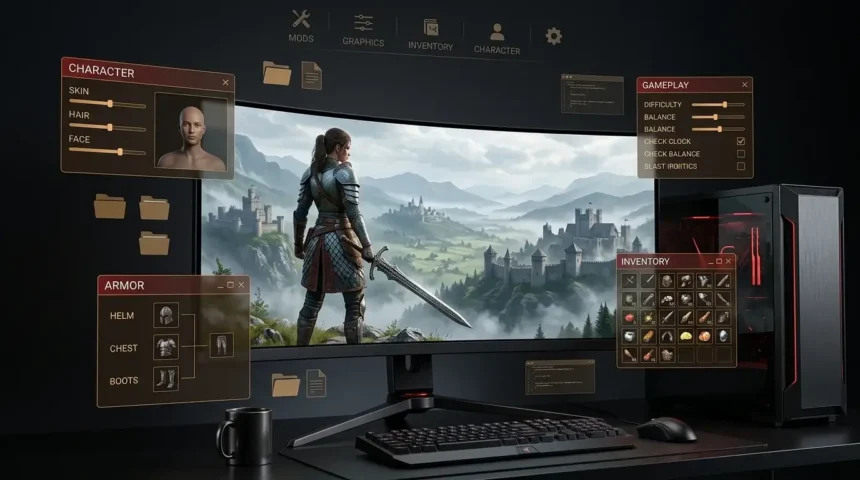
Crimson Desert mods give PC players more ways to customize the game, from quality-of-life improvements and inventory changes to graphics upgrades, camera tweaks, gameplay changes, and character customization.
The modding scene has grown quickly since the game’s release. Current Crimson Desert mod listings include categories for gameplay, armor, characters, audio, items, UI, utilities, visuals, weapons, and more.
This guide explains how Crimson Desert mods work, what types are available, how to install them, and what to check before using one.
Does Crimson Desert Have Mods?
Yes. Crimson Desert has an active PC modding community, with a large collection of community-made modifications available for the game.
Current mod listings include more than 1,500 Crimson Desert mods and thousands of associated files.
The available mods range from small quality-of-life changes to major gameplay, graphics, inventory, character, and camera modifications.
Console players generally do not have the same modding options as PC players, so this guide is primarily focused on the PC version.
What Can You Change With Crimson Desert Mods?
There is a wide range of modifications available.
Gameplay Mods
Gameplay mods can change how certain mechanics work.
Examples include modifications affecting:
- Stamina
- Combat
- Skills
- Inventory
- Item quantities
- Durability
- Quests
- Loot
- Difficulty
- Time and waiting systems
Some mods are designed to make progression easier, while others change specific gameplay mechanics.
Character Mods
Character-related mods can change appearances, armor, clothing, hair, and other visual elements.
Some community projects also expand character-creation options.
Graphics Mods
Graphics mods can change the game’s visual presentation.
Examples include:
- Lighting adjustments
- Shadows
- Color grading
- LOD improvements
- Reshade presets
- Renderer changes
- Visual effects
Current Crimson Desert mod listings include multiple graphics-overhaul projects.
Camera Mods
Camera modifications can change how the game looks and feels while exploring or fighting.
Some current mods provide alternative camera behavior, remove automatic zooming, or add different perspectives.
Inventory and Quality-of-Life Mods
These are among the most useful mods for players who want to reduce repetitive tasks.
Current examples include:
- Expanded inventory storage
- Larger item stacks
- Expanded vendor inventories
- Additional quality-of-life options
- Faster access to certain systems
For example, the current mod listings include inventory expansion and larger-stack modifications.
Best Crimson Desert Mods to Try
Rather than calling one mod universally “the best,” it makes more sense to choose based on what you want to change.
1. Mod Managers
If you plan to use several mods, a mod manager can make installation and removal easier.
Definitive Mod Manager (DMM) currently supports multiple mod types, including JSON patches, textures, file replacements, ASI/DLL plugins, and PAZ overlays.
Another option is CDUMM, a Crimson Desert mod manager that supports installing and updating mods and integrates with Nexus Mods.
2. Inventory Mods
Inventory modifications are useful if you regularly run out of storage.
Current mods can substantially increase storage capacity beyond the game’s standard limits.
3. Visual Mods
If you want to change the game’s presentation, visual mods can adjust lighting, color, shadows, LOD, and other graphical elements.
One current example is an Enhanced LOD project that modifies LOD, global illumination, shadows, and other visual systems.
4. Character Mods
Character modifications can provide additional customization options or replace existing armor and appearance elements.
The current mod scene includes character-creation and armor-related projects.
5. Quality-of-Life Mods
Quality-of-life modifications can remove small frustrations without necessarily changing the entire game.
Examples include inventory changes, storage improvements, faster access to systems, and other convenience features.
How to Install Crimson Desert Mods
The installation process depends on the individual mod.
Some modifications use a mod manager, while others require manual installation.
A typical workflow looks like this:
Step 1: Check the Mod Requirements
Before downloading anything, read the mod’s description.
Check:
- Required game version
- Required mod manager
- Required dependencies
- Installation instructions
- Known conflicts
- Compatibility notes
This is especially important because Crimson Desert continues to receive updates.
Step 2: Back Up Your Game Files
Create a backup before installing modifications that alter game files.
If something goes wrong, having a clean backup makes it easier to restore the original installation.
Step 3: Install the Required Mod Manager
If the mod requires a manager, install the version recommended by the mod author.
For example, current Crimson Desert modding guides use tools such as JSON Mod Manager, while other managers support additional mod formats.
Step 4: Install One Mod First
If you are new to modding, avoid installing ten modifications at once.
Install one mod and launch the game.
If everything works correctly, add another.
This makes troubleshooting much easier.
Step 5: Check for Conflicts
Two modifications can sometimes change the same files or systems.
If the game stops working after installing a new mod, remove the newest modification first and test again.
What Is a Crimson Desert Mod Manager?
A Crimson Desert mod manager is software that helps organize, install, enable, disable, update, and sometimes remove game modifications.
Two examples currently used by the Crimson Desert modding community are:
- CDUMM
- Definitive Mod Manager
CDUMM currently includes Nexus integration and update notifications for installed mods.
DMM supports several mod formats and provides load-order management and backup functionality.
Do Crimson Desert Mods Work After Game Updates?
Not always.
This is one of the most important things to remember when modding Crimson Desert.
A game update can change files or systems that a modification depends on. As a result, a previously working mod may stop functioning or require an update.
Current Crimson Desert mod listings show mods being updated in response to newer game versions, including mods updated in September 2026.
Before launching a heavily modded installation after a major game update, check the individual mod pages for compatibility information.
Can Mods Break Crimson Desert?
Yes.
A mod can cause:
- Crashes
- Visual glitches
- Missing textures
- Broken gameplay systems
- Save-related problems
- Mod conflicts
- Unexpected behavior
The risk depends on what the modification changes.
Mods that directly alter game files or major gameplay systems generally require more care than simple visual changes.
How to Safely Use Crimson Desert Mods
Follow these basic rules:
- Keep a clean backup of your game.
- Read the entire mod description.
- Check the required game version.
- Check dependencies.
- Install mods one at a time.
- Keep your mod manager updated.
- Avoid mixing conflicting modifications.
- Back up important saves.
- Check mod pages after major game updates.
- Remove outdated mods if they cause problems.
Most importantly, download modifications from established sources and scan unfamiliar files before running them.
Where Can You Find Crimson Desert Mods?
A major community hub for Crimson Desert modifications is Nexus Mods, which currently has a dedicated Crimson Desert mod section with thousands of files across multiple categories.
The available categories include gameplay, armor, characters, audio, items, UI, utilities, visuals, and weapons.
For installation instructions, always follow the specific instructions provided by the mod author rather than assuming every mod uses the same process.
Crimson Desert Mods FAQs
Are there mods for Crimson Desert?
Yes. The PC version has a large and growing modding community with modifications covering gameplay, graphics, characters, inventory, weapons, UI, camera systems, and other areas.
Are Crimson Desert mods free?
Many community-created mods are available for free, although individual platforms or creators may have their own requirements.
Can you use Crimson Desert mods on PS5 or Xbox?
The modding tools and community projects discussed in this guide are primarily intended for the PC version. Console versions do not provide the same open modding environment.
What is the easiest way to install Crimson Desert mods?
For mods that support it, a dedicated mod manager can simplify installation and removal. Always follow the instructions provided for the specific modification.
Can Crimson Desert mods stop working after an update?
Yes. Game updates can change files or systems that mods depend on, so a modification may need to be updated before it works correctly again.
Can mods affect my save?
Some modifications can interact with gameplay or save-related systems. Back up important saves before experimenting with mods, especially those that alter progression, inventory, quests, or other core systems.
Final Thoughts
Crimson Desert mods give PC players plenty of ways to customize their experience.
The current modding scene includes everything from inventory and quality-of-life improvements to graphics overhauls, camera changes, character customization, and gameplay modifications.
If you are new to modding, start with one simple modification, back up your files, and pay close attention to compatibility after game updates.
For more information about the game itself, continue with our Crimson Desert Guide, which covers the map, chapters, multiplayer status, combat, fast travel, and other major gameplay topics.
Strafe is an ARPG content creator and gamer focused on Path of Exile (PoE) and Path of Exile 2 (PoE 2). His content comes from hands-on gameplay, exploring builds, bosses, mechanics, maps, and the many challenges that make the PoE experience so addictive.